|
 |
TouchMetal |
|
Although not a clone of an older board but rather an original creation by Dr. Nicholas J. Macias, the TouchMetal board resembles—in terms of usage and functionality—the classic "University" boards that allowed users to explore and learn how computers operate at a very low level.
Various resources are available on the touchmetal.org website, including a downloadable manual and a collection of exercises, as well as an online emulator.
|
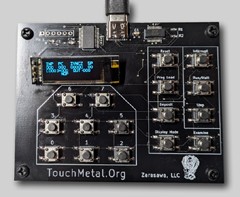
TouchMetal

|
|
TouchMetal board |
|
|
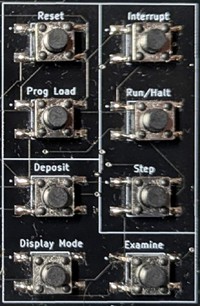
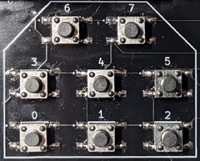
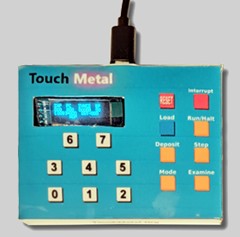
As with "classic" boards (KIM-1, MK-14, etc.), the keypad consists of command keys for accessing various functions, as well as numeric keys.
The first striking feature is the absence of keys A through F, which makes it clear that hexadecimal is not used...
but there are also no 8 and 9 keys which means that octal is used!
Second surprise: the display! Instead of a single row of red LEDs, there is a multi-line LCD screen that allows access to various display modes.
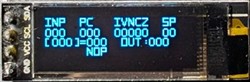
This board certainly had everything to intrigue and attract me....
|
|
|
|
This TouchMetal card can be purchased from two sites but is not exported to Europe.
For Europeans, it will be necessary to go through a US buyer.... including the additional costs...
|
|
|
The TouchMetal board is sold either fully assembled or as a kit.
with :
A USB-C cable
A three-panel reference card for the programmer
and as an option :
A printed copy of the instruction manual
A workbook
|
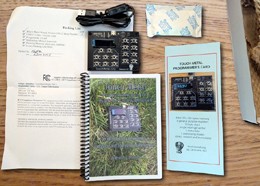
Unpacking
|
|
|
|

|
|
The board's assembly language consists of around forty instructions and is quite similar to well-known languages (6502, SC/MP, etc.), featuring flags (carry, negative, zero, etc.) and eight registers.
Thus, standard instructions such as OR, XOR, AND, NOT, ROR, and ROL are present, but the ADD, SUB, MUL, DIV, and MOV instructions are also included.
Addressing can be immediate, direct, or indirect.
Instruction encoding, register contents, and memory addressing are in octal.
On the touchmetal.org website, two tools allow you to discover how the board works.:
an emulator for loading programs in octal and testing them
an assembler to encode a source program into octal instructions.
|
|
|
|
My interface, TM_Interface.xls, allows you to create TouchMetal programs, save and print them, and assemble them by saving the generated code.
|
|
|
|
Uploading programs
On Windows, note the port number in Device Manager (e.g., COM33).
In TeraTerm, configure your COMxx serial port to 9600 and set the transmission delays to 30 and 300.
On the TouchMetal, press "Prog Load" then send the code via TeraTerm using either file transfer or copy/paste.
|
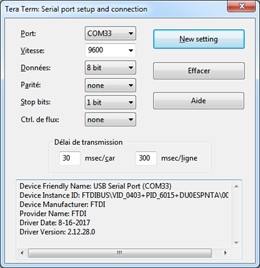
TeraTerm
|
|
|
Apart from the touchmetal.org site, and merchant sites such as Lectronz Tindie and Amazon, other resources are available on the web.
|
|
|
Gitlab
Several resources, but above all two programs, are available on GitLab :
asm.c : code source programme assembleur
upload.c : code source du programme de transfert du code machine vers le TouchMetal
|
|
|
Hackaday
TouchMetal is also present on Hackaday....
|
|
|
Youtube
Many videos on YouTube...
|
|
|
Manuels
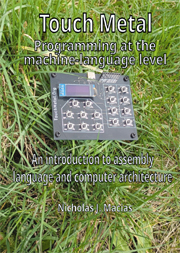
The documentation is available in PDF format :
|
|
|
|
Below are a few small programs as examples.
|
(*) Auteur : Dr Niccholas J. Macias
|
|
|
|
|
Since the labels on the TouchMetal board corresponding to the keys are quite legible, an overlay for better readability wasn't strictly necessary...
But just for the fun of it...
|
|

| |


 touchmetal.org...
;)
;)
;)
;)


;)

 TouchMetal Programming machine language level
 TouchMetal Practice Problems architecture
;)
;)

 TouchMetal Interface
; "preview")
;)